Introducing Anyscale Agent Skills: Build faster, debug smarter, and optimize AI workloads running on Ray
Today we're announcing the general availability of Anyscale Agent Skills, equipping popular AI coding agents with the Ray and Anyscale expertise needed to write, deploy, debug, and optimize workloads at scale. Agent Skills are distributed as a first-party feature of the Anyscale CLI, and are available today on Claude Code and Cursor.
Three skill groups, generally available today, support the full development lifecycle from generating workloads to deploying and debugging in production:
Workload Skills → Generate code and configs for LLM serving, multimodal data processing, distributed training, batch inference, and embedding generation
Platform Skills → Debug, fix, and redeploy live workloads using logs, metrics, and managed workspaces
Infra Skills → Deploy Ray on Kubernetes or VMs with guided, production-ready setup
Working together in sync, Workload and Platform Skills achieves 5x development speed compared to general-purpose agents like Claude Code and Cursor.
Get started by installing these skills via the Anyscale CLI:
pip install -U anyscale
anyscale login

anyscale skills install --platform claude-code
# or
anyscale skills install --platform cursor
In parallel, Anyscale is launching an Optimization Services Program for Ray, where AI agents paired with forward deployed engineers analyze throughput bottlenecks and GPU waste to generate tuning recommendations to help optimize cost and performance of production AI workloads.
Request early access to the Optimization Services Program here.
LinkWhy introduce Anyscale Agent Skills
“By giving our coding agents deep, native knowledge of the Anyscale Platform, from compute configs to cluster behavior, we're putting the full power of distributed AI in the hands of every developer, not just the infrastructure experts."
Emin Mammadov
Senior Software Developer - AI Platform
Geotab
The shift towards foundation models has made large-scale, GPU-accelerated computing table stakes. Not just for training runs, but also for the data pipelines where AI models are used to curate and process multimodal datasets – video, images, text, etc – at scale. With over 12M downloads per week, Ray has emerged as the most widely adopted compute framework to handle this AI compute complexity.
But running AI workloads at scale is not just about scaling Python with Ray. It requires aligning application code with the right infrastructure, while delivering the right setup and configs to optimize for performance and cost. Take deploying an LLM endpoint. You need to size models to GPUs, configure tensor parallelism, tune your inference engine such as vLLM as well as the Ray Serve library for scaling and other infrastructure operations. When it breaks, you are debugging OOMs across distributed logs and metrics. More time is then debugging and fixing errors than shipping innovation.
Anyscale, the creators of Ray, have built this expertise across hundreds of production deployments. Agent Skills bring that knowledge to build and debug, once limited to our Forward Deployed Engineers (FDE), on-demand to every AI team.
LinkWhy general-purpose coding agents break down
While general-purpose agents can write Python, complex domains like distributed computing require specialized knowledge that AI coding agents simply do not have: how to plan for GPU memory, navigate the latest Ray APIs, or debug cluster failures. For Ray and Anyscale specifically, they introduce four systematic failure modes that slow down, or even block, the path from development to production:
Resource planning: The agent generates configurations without accounting for hardware constraints, setting incorrect tensor parallelism and miscalculating GPU memory across weights, KV cache, and runtime overhead, leading to OOM errors that only surface at runtime.
Stale APIs: General-purpose agents are pre-trained on large amounts of public data containing legacy Ray code, so they confidently generate outdated patterns and deprecated interfaces that no longer match the current version of Ray, producing vLLM parameters, Ray Serve configs, and autoscaling settings that break at runtime.
Broken configs: They produce configuration files with missing fields, incorrect structures, or invalid resource references that don't match your deployment environment, causing jobs to fail silently or behave incorrectly in ways that are difficult to trace.
No debug loop: When a job fails mid-run, the agent cannot query live cluster state, inspect Ray Dashboard metrics, or correlate the failure with the workload conditions that caused it, leaving you to manually grep through hundreds of logs and starting over.
Left uncorrected, these gaps keep workloads stuck in development and out of production, wasting the GPU hours, compute costs, and engineering time that distributed computing is supposed to save.
Skills emerged in late 2025 when Anthropic introduced a modular framework to equip AI agents with practical, specialized capabilities. Instead of relying on lengthy, one-off prompts, developers could package instructions, scripts, and context into reusable skill folders that agents dynamically load on demand. This approach quickly evolved into an open industry standard adopted by OpenAI, Cursor, and GitHub Copilot, transforming how domain expertise is encoded into AI agents.
LinkAnyscale Agent Skills overview
Anyscale Agent Skills gives AI coding agents the platform knowledge and expertise from the team that created Ray and Anyscale required to write, deploy, debug, and optimize Ray workloads on Anyscale. Each skill guides the AI through requirements gathering, constraint validation, code generation from tested templates, and deployment using current APIs.
Workload Skills: Go from prompt to running workloads
Figuring out the right config, validating that your GPU tier can support the model, and closing the gap between what the docs say and what actually works in your environment takes most of the time. Workload Skills handle all of that upfront. The agent asks the right questions, checks constraints before generating anything, and produces code from tested templates against current Ray APIs.
Skill | What It Does |
| Deploy LLMs with Ray Serve LLM: model sizing, GPU planning, multi-LoRA, OpenAI-compatible endpoints, autoscaling |
| Serve non-LLM models as scalable REST endpoints: sklearn, XGBoost, PyTorch, TensorFlow, multi-model composition, async inference |
| Design offline batch inference pipelines via |
| Generate embeddings at scale with Ray Data: text, image, multimodal, vector database integration |
| Distributed training and fine-tuning: PyTorch, Lightning, HF Transformers, XGBoost |
Platform Skills: Deploy, debug and fix live workloads
When a Ray job fails in production, you need live cluster state, not just code. Platform Skills connect the agent directly to the Anyscale API and Ray Dashboard, so when something goes wrong, /anyscale-platform-inspect can read logs, metrics, and events from the live cluster to understand what actually happened. /anyscale-platform-fix takes that context, patches the code, redeploys, and verifies the fix in the same conversation.
Skill | What It Does |
| Generate Anyscale configs and execute workloads (workspaces, jobs, services) via the CLI |
| Read-only diagnosis of live workloads: logs, metrics, events via the Anyscale API and Ray Dashboard |
| Full debug-fix-validate loop: diagnose with |
| Source-backed answers about Ray internals, architecture recommendations, and API usage grounded in docs and source code |
Infrastructure Skills: Set up Anyscale from any infrastructure end to end
Standing up Anyscale on Kubernetes or cloud VMs involves a long chain of decisions across Helm, Terraform, IAM, networking, and GPU configuration, each of which has to be right for the rest to work. Infra Skills walk the agent through each step in sequence, generating configs validated for your specific environment rather than adapting generic examples that may not match your CUDA version, instance type, or network topology.
Skill | What It Does |
| Guided deployment on EKS, GKE, or AKS: Helm operator, networking, GPU config |
| Deploy Anyscale on AWS VMs: VPC, IAM, S3, security groups, EFS, MemoryDB |
| Deploy Anyscale on GCP VMs: VPC, IAM, GCS, firewall, Memorystore, Workload Identity Federation |
Optimization Services Program: Reduce cost and maximize performance
Anyscale’s new Optimization Services Program brings AI agents working alongside Forward Deployed Engineers to analyze Ray on Anyscale workloads. Together, they identify throughput bottlenecks, uncover GPU inefficiencies, and generate targeted tuning recommendations to improve performance and reduce cost.
This program is designed for real-world impact from day one. By pairing automated analysis with hands-on expertise, teams can validate optimizations for production workloads, ensuring changes translate into measurable gains in reliability, throughput, and cost-efficiency.
Request early access here.
LinkInstall via the Anyscale CLI
Skills are installed directly through the Anyscale CLI without requiring manual file management, nor extra credentials. Just pick your AI coding tool and run:
# Browse the skills catalog
anyscale skills list

# Install for your AI coding tool
anyscale skills install --platform claude-code
anyscale skills install --platform cursor
anyscale skills install --platform all

# Update to the latest version
anyscale skills update

# Clean removal
anyscale skills removeLinkSecurity by default
For teams operating in regulated environments or managing shared infrastructure, skills enforce safety policies that the AI agent cannot bypass:
Security acknowledgment gate: On first use, the agent surfaces the full security policy and requires explicit acceptance before any action
Destructive command blocking: Pre-tool-use hooks screen every shell command, denying dangerous operations:
rm -r, AWSterminate-instances,kubectl delete,terraform apply,anyscale cloud delete, and dozens moreRead-only Terraform: Only show, validate, state list, and other non-mutating subcommands are permitted
Scoped permissions:
/anyscale-platform-inspectis strictly read-only; only/anyscale-platform-fixcan launch workloads, and it declares this upfront
LinkDeploy in minutes, not hours
Consider a common scenario: deploying a 70B model and hitting an out-of-memory error. This is exactly what skills prevent.
Without skills, deploying Llama 3.1 70B on Anyscale looks like this:
Read vLLM and Ray Serve integration docs
Search for config examples and adapt to your GPU tier
Write
service.yaml, and iterate on trial-and-error deploymentsHit OOM → manually query logs → adjust tensor parallelism
Research the tool-calling parser for
vLLM --tool-call-parserRedeploy, validate, and hope it works this time
With Anyscale Skills:
/anyscale-workload-llm-serving deploy Llama 3.1 70B on L40S GPUs
with autoscaling from 1 to 4 replicas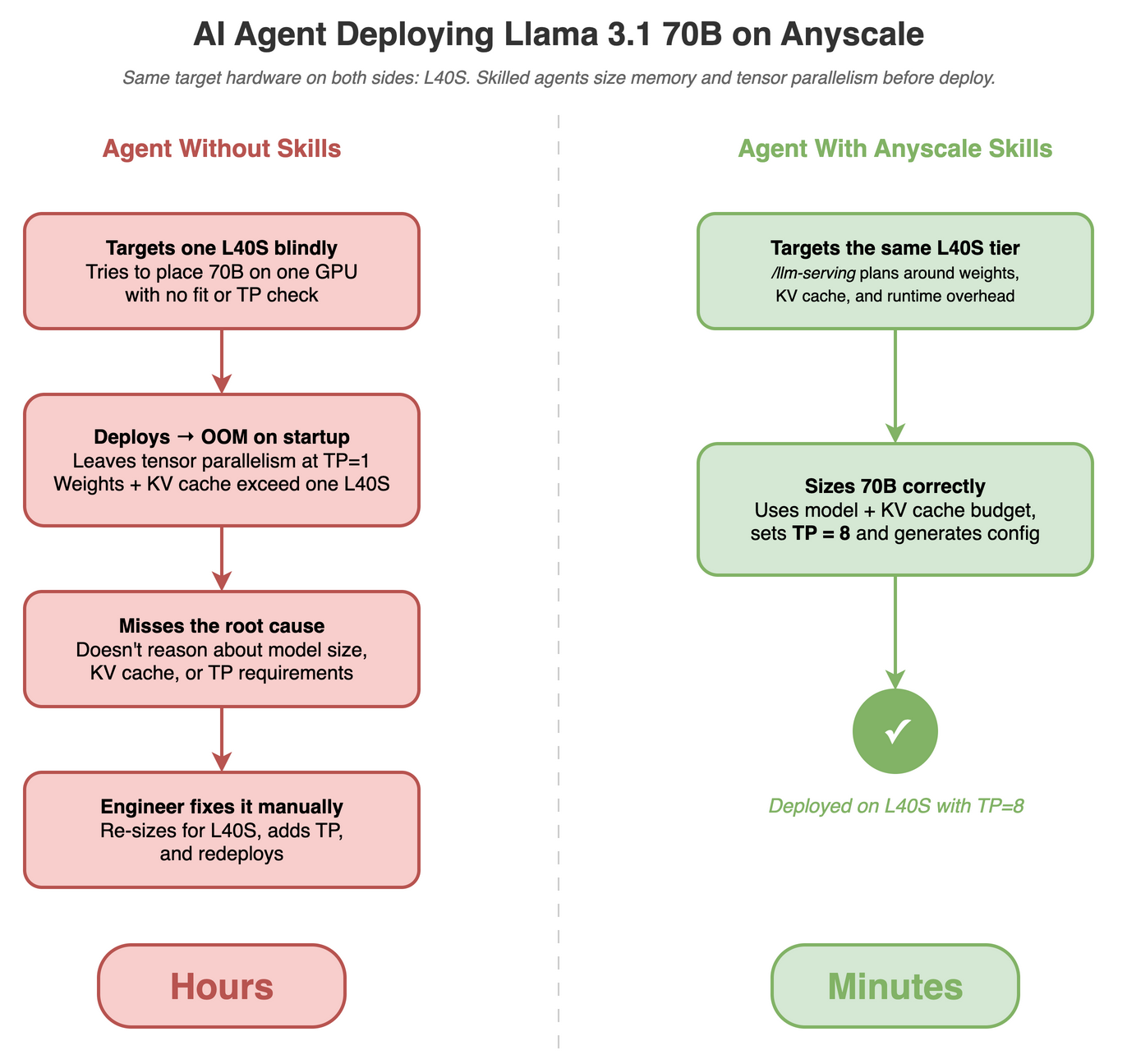
The agent gathers targeted requirements (LoRA adapters, custom routing and latency SLA), checks that a 70B model will not fit on a single L40S once model weights, KV cache, and runtime overhead are accounted for, sets TP=8, generates a complete Ray Serve + vLLM deployment with service.yaml, and delegates to /anyscale-platform-run. If the service fails, /anyscale-platform-fix collects logs via the Anyscale API, diagnoses the root cause, patches the config, and redeploys all within the same place.
The same pattern applies across the skill set. Run LLM batch inference at scale:
/anyscale-workload-ray-data generate LLM BATCH INFERENCE using the data
from https://llm-guide.s3.us-west-2.amazonaws.com/data/ray-data-llm/customers-2000000.csv
and Qwen/Qwen3-30B-A3B-Instruct-2507-FP8 (HuggingFace) using L40S GPUs
Or, diagnose a failing job:
/anyscale-platform-inspect prodjob_abc123 - focus on OOM errors
and memory usageLinkCombining Skills
Skills work together out of the box. Reference multiple skill references into a single prompt and the agent executes each in order, carrying context from one to the next.
Build a data processing pipeline with /anyscale-workload-ray-data, then deploy and validate it with /anyscale-platform-run:
Use /anyscale-workload-ray-data to create a batch pipeline that extracts
text from PDF files and generates a one-paragraph summary per page
using Qwen3-8B-instruct model.

Then use /anyscale-platform-run to launch it in an Anyscale workspace
and verify it runs end-to-end.

The PDF files are located in s3://anyscale-rag-application/100-docs/.
The agent starts with /anyscale-workload-ray-data, gathering requirements on the model, input format, and output schema, then selects the ray.data.llm template for vLLM-backed inference and generates a complete pipeline that reads PDFs from S3, chunks pages, and runs summarization through Qwen3-8B. It then hands off to /anyscale-platform-run, which generates a workspace.yaml with the right GPU instance type, submits the job, and streams logs until completion.
LinkWhat's Coming Next
Anyscale Agent Skills is actively evolving alongside the Ray ecosystem and the broader AI coding agent landscape. We are working on additional skills covering more Ray libraries, deeper Anyscale platform integrations, and support for new AI coding tools as they adopt the Agent Skills standard.
We will announce new skills as they ship. In the meantime, install the current skills and let us know what you want to see next.
Anyscale Agent Skills documentation
Optimization Services Program request
Skill Set | What It Does | Availability |
Generate code and configs for LLM serving, distributed training, batch inference, and embeddings | GA – Anyscale CLI | |
Full debug-fix-deploy loop for live Ray workloads -- inspect logs, patch code, redeploy in one conversation | GA – Anyscale CLI | |
Guided end-to-end Anyscale deployment on Kubernetes (EKS, GKE, AKS) or cloud VMs | GA – Anyscale CLI | |
Optimization Services Program | Analyze workloads for cost, throughput, and production readiness -- reduce GPU waste and fix bottlenecks |